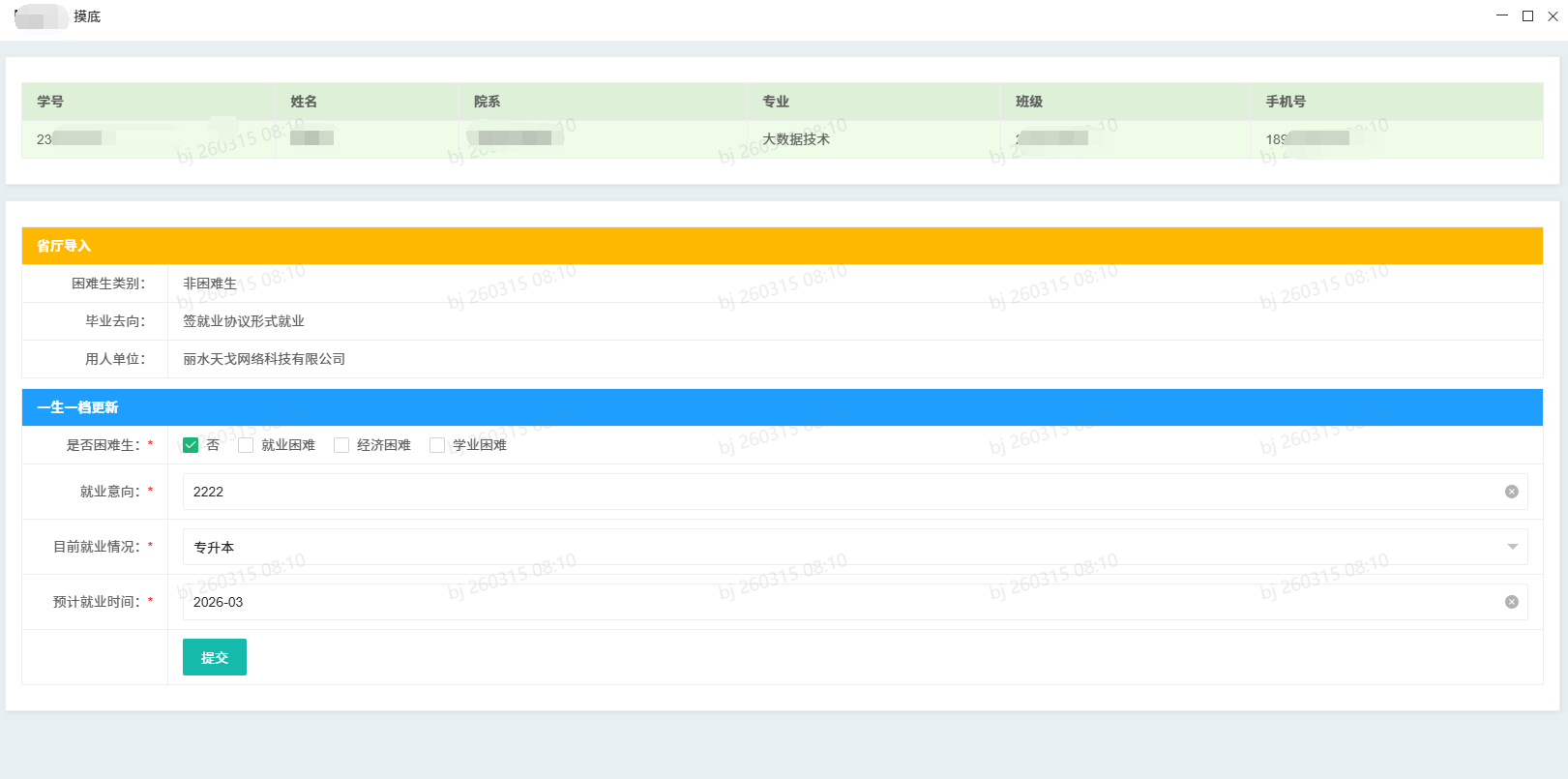
asp.net core layui,绑定数据,更新数据,验证checkbox必选等完整的添加,修改程序
一、前端
@{
    Layout = "_LayoutAdminAdd";
    ViewData["Title"] = "一生一档:就业帮扶台账-摸底";
}<div class="layui-fluid">
    <div class="layui-panel layui-padding-3">
        <table class="layui-table" width="100%">
            <thead>
                <tr>
                    <th>学号</th>
                    <th>姓名</th>
                    <th>院系</th>
                    <th>专业</th>
                    <th>班级</th>
                    <th>手机号</th>
                </tr>
            </thead>
            <tbody>
                <tr>
                    <td>@Model.Stu.xh</td>
                    <td>@Model.Stu.xm</td>
                    <td>@Model.Stu.yx</td>
                    <td>@Model.Stu.zy</td>
                    <td>@Model.Stu.bj</td>
                    <td>@Model.Stu.phone</td>
                </tr>
            </tbody>

        </table>


    </div>
    <br />

    <div class="layui-panel layui-padding-3">

        <table class="layui-table" width="100%">
            <thead>
                <tr>
                    <th colspan="2" class="layui-bg-orange">省厅导入</th>

                </tr>

            </thead>
            <tbody>
                <tr>
                    <td width="120" align="right">困难生类别:</td>
                    <td>@Model.Stu.kdslb</td>
                </tr>
                <tr>
                    <td align="right">毕业去向:</td>
                    <td>@Model.Stu.byqx</td>
                </tr>
                <tr>
                    <td align="right">用人单位:</td>
                    <td>@Model.Stu.yrdw</td>
                </tr>
            </tbody>

        </table>
        <form class="layui-form" method="post" id="form1" lay-filter="form1">

            <table class="layui-table" width="100%">
                <thead>
                    <tr>
                        <th colspan="2" class="layui-bg-blue">一生一档更新</th>
                    </tr>

                </thead>
                <tbody>
                    <tr>
                        <td width="120" align="right">是否困难生:<font color="red">*</font></td>
                        <td>
                            <input type="checkbox" name="sfkds" title="否" value="否" @((Model.Stu.sfkds ?? "").Contains("否") ? "checked" : "")>
                            <input type="checkbox" name="sfkds" title="就业困难" value="就业困难" @((Model.Stu.sfkds ?? "").Contains("就业困难") ? "checked" : "")>
                            <input type="checkbox" name="sfkds" title="经济困难" value="经济困难" @((Model.Stu.sfkds ?? "").Contains("经济困难") ? "checked" : "")>
                            <input type="checkbox" name="sfkds" title="学业困难" value="学业困难" @((Model.Stu.sfkds ?? "").Contains("学业困难") ? "checked" : "")>
                        </td>
                    </tr>
                    <tr>
                        <td align="right">就业意向:<font color="red">*</font></td>
                        <td>
                            <input type="text" name="jyyx" id="jyyx" asp-for="Stu.jyyx" lay-affix="clear" placeholder="请输入,就业摸底数据:包括意向单位、岗位、就业地等" autocomplete="off" class="layui-input" lay-verify="required">
                            </td>
                        </tr>
                    <tr>
                            <td align="right">目前就业情况:<font color="red">*</font></td>
                            <td>

                                <select asp-for="Stu.jyqk" lay-search="" lay-creatable="" name="jyqk" id="jyqk" lay-verify="required">
                                    <option value="">请选择</option>
                                    <option>签定就业协议形式就业</option>
                                    <option>签劳动合同形式就业</option>
                                    <option>其它录用形式就业</option>
                                    <option>实习中</option>
                                    <option>求职中</option>
                                    <option>签约中</option>
                                    <option>专升本</option>
                                    <option>考公考编</option>
                                    <option>暂不就业</option>
                                    <option>境外留学</option>
                                    <option>应征义务兵</option>
                                    <option>自由职业</option>
                                    <option>自主创业-创立公司</option>
                                    <option>自主创业-个体工商户</option>
                                </select>

                            </td>
                        </tr>
                        <tr>
                            <td align="right">预计就业时间:<font color="red">*</font></td>
                            <td>

                                <input type="text" name="yjjysj" id="yjjysj" asp-for="Stu.yjjysj" lay-affix="clear" placeholder="请输入" autocomplete="off" class="layui-input" lay-verify="required">
                                </td>
                        </tr>
                        <tr>
                                <td></td>
                                <td>
                                      <input type="hidden" name="fst" id="fst" asp-for="fst">
                                      <input type="hidden" name="snd" id="snd" asp-for="snd">
                                      <input type="hidden" name="thd" id="thd" asp-for="thd">
                                      <input type="hidden" name="no" id="no" asp-for="no">
                                      <input type="hidden" name="stuid" id="stuid" asp-for="Stu.id" class="layui-input">
                                      <button class="layui-btn btn-block" lay-submit lay-filter="form1-submit">提交</button>
                                </td>
                         </tr>
                   </tbody>
               </table>

             </form>

     </div>
 </div>
 <script>
     layui.config({
         base: '/layui/' // 静态资源所在路径
     }).extend({
         index: 'lib/index' //主入口模块
     }).use('index',function () {         var $ = layui.$;         var laydate = layui.laydate;         var form = layui.form;         var layer = layui.layer;
         laydate.render({
           elem: '#yjjysj',
           type: 'month'
         });          //监听提交
         form.on('submit(form1-submit)', function (data) {             //判断checkbox是否选中
             if ($('input[name="sfkds"]:checked').length == 0) {
                 layer.msg("请选择是否困难生");                 return false;
             }
         });
     }); </script>
二、后端
using Microsoft.AspNetCore.Authorization;
using Microsoft.AspNetCore.Mvc;
using Microsoft.AspNetCore.Mvc.RazorPages;
using System.Security.Claims;
using System.Text;
using xxtsoft.Common;
using xxtsoft.Core;
namespace xxtsoft.Web.Entry.Pages.sysadmins.stu
{    //登录判断
    [Authorize]
    public class stu_bftz_add_mdModel : PageModel
    {

        public string loginxm = "";//登录用户名
        public string loginRole = "";//登录角色
        public string loginSid = "";//登录id
        public string GivenName = "";//真实姓名

        [BindProperty] public Stu Stu { get; set; } = new Stu();
        [BindProperty] public string id { get; set; }
        [BindProperty] public string fst { get; set; }
        [BindProperty] public string snd { get; set; }
        [BindProperty] public string thd { get; set; }
        [BindProperty] public string no { get; set; }
        private readonly SqlSugar.ISqlSugarClient _db;
        public stu_bftz_add_mdModel(SqlSugar.ISqlSugarClient db)
        {   this._db = db;
        }   public IActionResult OnGet()
        {            #region 登录信息
            loginxm = User.Identity.Name;
            loginRole = User.Claims.FirstOrDefault(c => c.Type == ClaimTypes.Role)?.Value;
            loginSid = User.Claims.FirstOrDefault(c => c.Type == ClaimTypes.Sid)?.Value;
            GivenName = User.Claims.FirstOrDefault(c => c.Type == ClaimTypes.GivenName)?.Value;            #endregion


            #region 权限判断
            fst = CommHelper.FilerForm(Request.Query["fst"]);
            snd = CommHelper.FilerForm(Request.Query["snd"]);
            thd = CommHelper.FilerForm(Request.Query["thd"]);
            no = CommHelper.FilerForm(Request.Query["no"]);            if (string.IsNullOrEmpty(fst) || string.IsNullOrEmpty(snd) || string.IsNullOrEmpty(no))
            {                return MessageHelper.ShowPre("参数错误");
            }            var qx = ManageHelper.qx(fst, snd, thd, loginRole);            if (qx != "200")
            {                return MessageHelper.ShowRedirect("无权限访问", "../desk/index");
            }            #endregion


            id = CommHelper.FilerForm(Request.Query["stuid"]);            if (!string.IsNullOrEmpty(id))
            {
                Stu = _db.Queryable<Stu>().Where(it => it.id == int.Parse(id)).First();
            }            else
            {                return MessageHelper.ShowPre("参数错误");
            }
            return Page();
        }        public async Task<IActionResult> OnPost()
        {
            id = CommHelper.FilerForm(Request.Query["stuid"]);            if (string.IsNullOrEmpty(id))
            {                return Content("请输入必填项");
            }
            Stu.id =int.Parse(id);            await _db.Updateable(Stu).Where("id=" + id).IgnoreColumns(ignoreAllNullColumns: true).ExecuteCommandAsync();            //if (Stu.id != 0)
            //{
            //    await _db.Updateable(Stu).Where("id=" + id).IgnoreColumns(ignoreAllNullColumns: true).ExecuteCommandAsync();
            //}
            //else
            //{
            //    await _db.Insertable(Stu).IgnoreColumns(ignoreNullColumn: true).ExecuteCommandAsync();
            //}

            return MessageHelper.ShowParentPre("操作成功");
        }
    }
}
三、效果